Hotlink Protection
Stop bandwidth theft in its tracks! The Hotlink Protection feature in iGelGiz prevents other websites from directly embedding your images and other media files. This means they can’t use your server resources to display your content on their site, saving you bandwidth and money.
Accessing Hotlink Protection Settings
In your WordPress admin dashboard, navigate to iGelGiz.
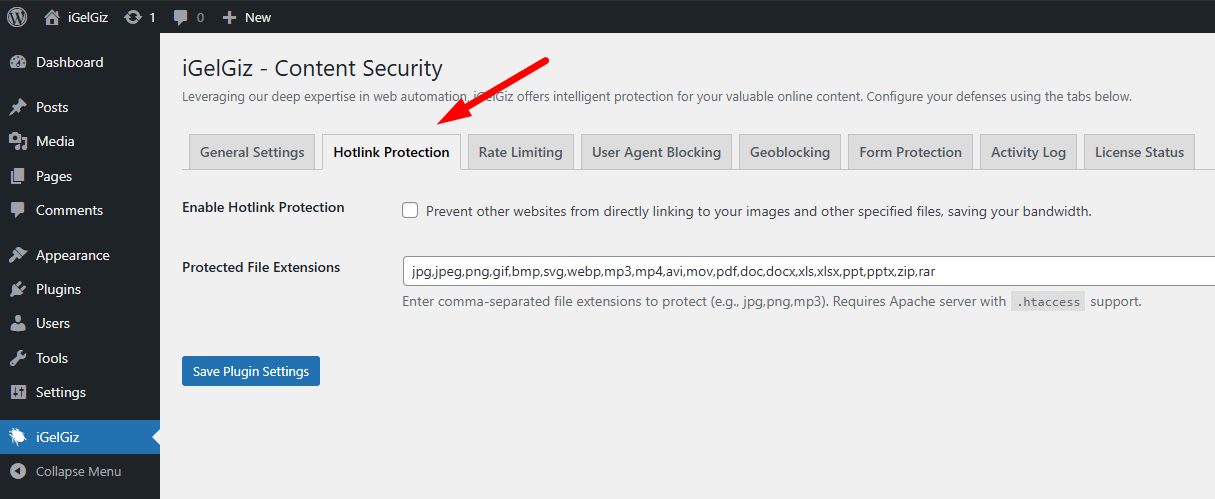
Click on the Hotlink Protection tab.
Available Options
Enable Hotlink Protection
What it does: When enabled, this feature blocks external sites from displaying your media files. If another site tries to embed your protected files, their visitors will typically see a broken image or be unable to access the file.
Configuration: * Check the box labeled: “Prevent other websites from directly linking to your images and other specified files, saving your bandwidth.”
Why it’s great for you: * Saves Bandwidth: Reduces the load on your server caused by other sites leeching your files. * Lowers Costs: Can significantly decrease your hosting bandwidth costs, especially if you have popular images or media. * Protects Your Assets: Ensures your media is primarily viewed on your own website.
Important Note: This feature typically requires an Apache web server (or a compatible one like LiteSpeed) and relies on modifications to your
.htaccessfile.
Protected File Extensions
What it does: This setting allows you to specify which types of files should be protected from hotlinking.
Configuration: * In the text field labeled “Protected File Extensions,” enter a comma-separated list of file extensions without the dot (e.g., jpg,jpeg,png,gif,mp3,pdf,webp). * iGelGiz comes with a comprehensive default list covering common image, audio, video, and document formats.
Why it’s great for you: * Granular Control: You decide exactly which file types are protected. * Comprehensive Protection: Safeguard not just images, but also videos, audio files, PDFs, and more.
Tip: Review the default list and customize it to include any specific file types unique to your site that you want to protect.
Saving Settings
After making any changes to these options, scroll to the bottom of the page and click the “Save Plugin Settings” button to apply them. Your .htaccess file will be updated with the necessary rules.
By enabling Hotlink Protection, you take a significant step in securing your server resources and ensuring your content isn’t misused. Keep your bandwidth for your actual visitors and let iGelGiz handle the freeloaders!