Form Protection (Honeypot)
Keep your website’s forms clean and free from spam with iGelGiz’s intelligent Form Protection, featuring advanced Honeypot technology. This feature is designed to trap and block automated spam bots from submitting nuisance entries to your comments, registration, login, and other public-facing forms, all without inconveniencing your legitimate users.
Accessing Form Protection Settings
In your WordPress admin dashboard, navigate to iGelGiz.
Click on the Form Protection tab.
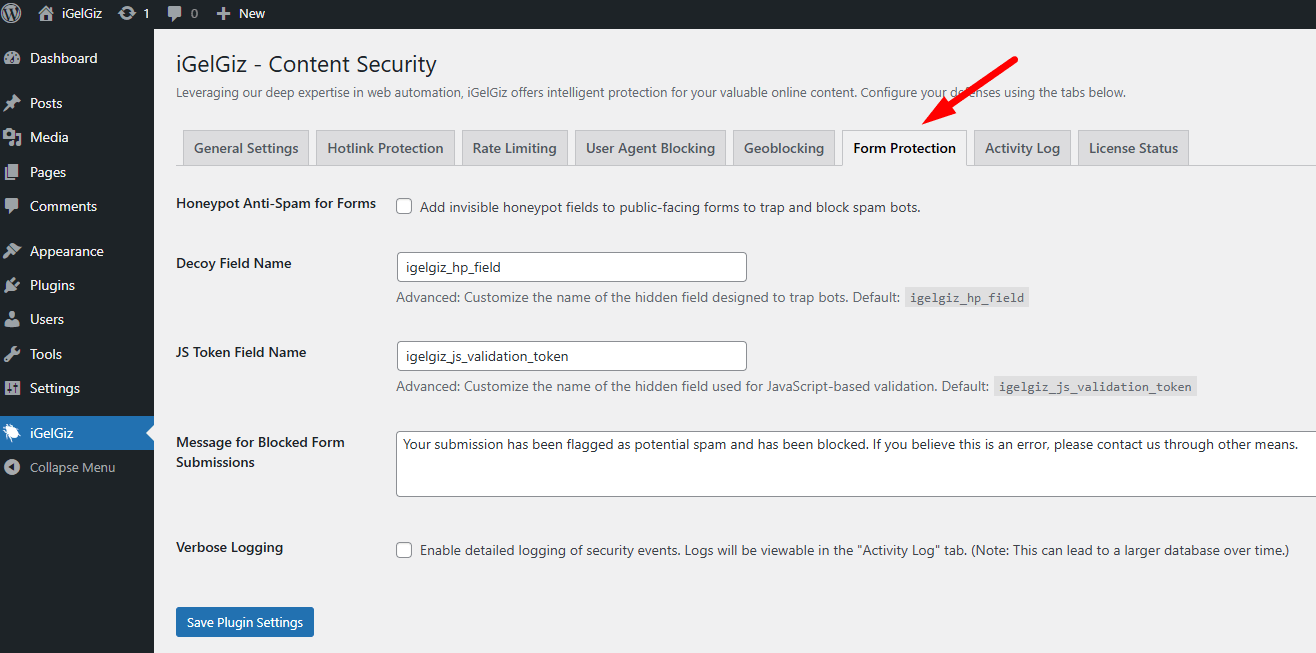
Available Options
Honeypot Anti-Spam for Forms
What it does: When enabled, iGelGiz automatically adds invisible “honeypot” fields to your website’s forms. These fields are hidden from human users but are irresistible to most spam bots. If a bot fills out this hidden field (which humans wouldn’t), the submission is flagged as spam and blocked. Additionally, a JavaScript-based token validation adds another layer of security, further ensuring that submissions are from genuine users.
Configuration: * Check the box labeled: “Add invisible honeypot fields to public-facing forms to trap and block spam bots.”
Why it’s great for you: * Massively Reduces Spam: Say goodbye to cluttered comment sections and fake user registrations. * User-Friendly: Completely invisible to real users, so there are no annoying CAPTCHAs or puzzles to solve. * Protects Multiple Forms: Works on common WordPress forms like comments, login, and registration. * Saves Time: Spend less time moderating spam and more time on what matters.
Decoy Field Name (Advanced)
What it does: This advanced option allows you to customize the HTML name attribute of the primary hidden honeypot field.
Configuration: * Enter your desired field name in the text box labeled “Decoy Field Name.” * The default value (e.g., igelgiz_hp_field) is generally effective. Changing this is typically not necessary unless you have a specific reason or are trying to avoid conflicts with other scripts that might interact with form fields.
Why it’s there (for advanced users): * Customization: Offers flexibility for unique site setups or to make it slightly harder for highly sophisticated bots that might target default field names (though this is rare).
JS Token Field Name (Advanced)
What it does: This advanced option allows you to customize the HTML name attribute of the hidden field used for JavaScript-based token validation.
Configuration: * Enter your desired field name in the text box labeled “JS Token Field Name.” * Similar to the decoy field name, the default (e.g., igelgiz_js_validation_token) is usually sufficient.
Why it’s there (for advanced users): * Further Customization: Provides an additional layer of obscurity for advanced configurations.
Message for Blocked Form Submissions
What it does: Defines the message that is displayed to a user (or bot) if their form submission is identified as spam and blocked by the honeypot.
Configuration: * Enter your custom message in the text area labeled “Message for Blocked Form Submissions.”
Why it’s great for you: * Clear Feedback: In the rare event a legitimate user’s submission is flagged (e.g., due to unusual browser extensions), this message can inform them. * Deters Bots: A clear rejection message can sometimes discourage repeated attempts from less sophisticated bots.
Saving Settings
Don’t forget to click the “Save Plugin Settings” button after adjusting these options.
iGelGiz’s Form Protection is a smart, unobtrusive way to maintain the integrity of your website’s interactions. By effectively filtering out bot submissions, you ensure that your user engagement is genuine and your administrative workload is significantly reduced. Enjoy cleaner forms and more meaningful interactions!